Contacts
- 4.6
- Rating
- 1.00M
- Installs
- Free
- Price

 Analysis by App-foxy
Managing calls sounds simple until a busy day turns the phone app into a small control center. I tested Contacts with that practical problem in mind: finding the right person, starting a call quickly, and keeping the contact list usable when I am moving between work, errands, and home. Built by KOFLEXI, this free communication app focuses on the everyday relationship between contacts and calls rather than trying to become a full messaging or social platform.
That narrow purpose is its biggest appeal. The app is available to everyone, runs on devices using Android 6.0 or later, and has reached over one million installs. Its current version is 31.0.0, while its average score sits at 4.6 from around 6,500 ratings. Those figures suggest that it has found a sizeable audience, but they do not replace hands-on judgment. What matters to me is whether it makes the small actions around calling less awkward.
My overall impression is that Contacts works best for people who want a straightforward dial-and-contact experience without spending time learning a complicated interface. It is less convincing for anyone looking for a complete communication hub with rich messaging, video meetings, deep contact organization, or advanced call-management tools. The app’s value comes from reducing friction in a familiar task, not from adding a long list of extras.
You May Also Like

 Blood Strike: 2.5 Anniversary
Blood Strike’s Loadouts Turn Every Drop Into a Tactical Gamble
A close look at Blood Strike’s custom loadouts: how fast access to signature weapons reshapes its battle royale rhythm, rewards preparation, and narrows the gap between fights.

 Pandora - Music & Podcasts
Pandora’s Music Is Easy to Start, but Harder to Recover
Pandora’s strength is its low-effort path from a seed to a station. Its weak spot is how much confidence it asks you to place in connection, setup, and quiet recovery.

 8 Ball Pool
 Is Built on Rivalries, Rematches, and Routine
A close look at the rivalries, rematches, shared routines, and unanswered safety questions that turn a quick pool match into a persistent mobile community.

 Samsung Music
’s Quiet Strength Is Playing What You Already Own
Its reach comes less from spectacle than from dependable access to a personal library. That simplicity is both the app’s strongest retention engine and its ceiling.

 AccuWeather: Weather Radar
AccuWeather Review: A Quick, Clear Forecast for Everyday Decisions
For everyday plans, the best forecast is the one you can understand quickly. AccuWeather makes rain timing, radar, and local conditions easy to act on, with a few trade-offs.

 Hill Climb Racing
Why Hill Climb Racing Still Turns Crashes Into One More Run
A tiny car, a bumpy hill and one more upgrade: Hill Climb Racing keeps resurfacing because its simple chaos makes every near-miss feel personal.
More From Our News Desk



How Contacts feels when connectivity matters
I find it useful to separate the part I can control—choosing the right saved person—from the part that depends on reception and the other phone. When connectivity is unreliable, I check the contact before trying again and avoid repeated calls from the same spot; moving somewhere with a steadier signal can be the more effective next step. That distinction helps set up a closer look at how the call workflow holds together.
Starting a call is only one part of the experience
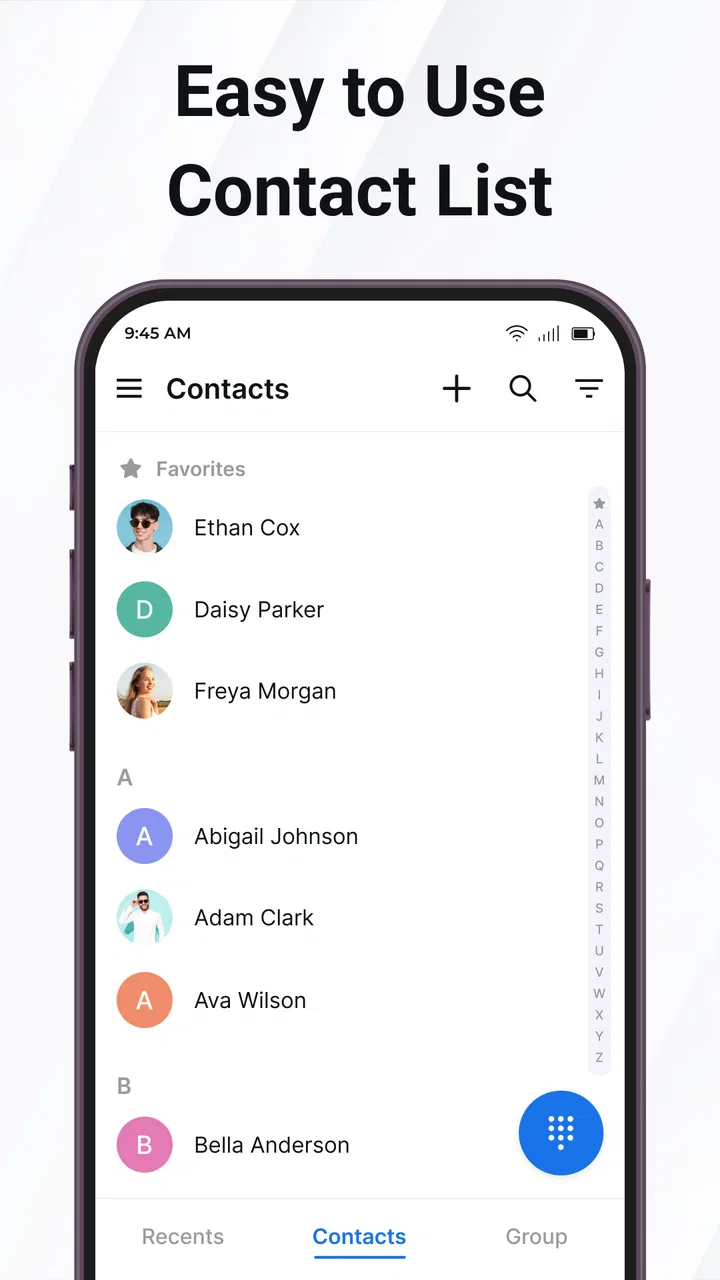
The app’s central workflow is easy to understand: open the contact area, locate a person, and move toward a call. That sounds obvious, but the quality of a calling app is often decided by how quickly it gets out of the way. I found the focused design more comfortable than applications that mix contacts with news feeds, promotions, chat tabs, and several competing communication buttons.
There is an important distinction between managing a contact and successfully connecting with that person. Contacts can help me choose the right entry and initiate the call, but the actual conversation still depends on the mobile network or another available calling connection. If reception is weak, the app cannot turn a poor signal into a stable conversation. I appreciate that separation because it keeps expectations realistic: this is a calling interface, not a replacement for network coverage.
That becomes noticeable in places such as underground stations, large buildings, elevators, or crowded venues. I can still use the app to prepare the call and confirm that I am selecting the intended person, but the result after pressing the call control depends on the phone’s connectivity. In those moments, the app’s clean purpose helps, although it cannot remove the uncertainty that comes with the network itself.
A realistic day-to-day scenario
Imagine leaving work while carrying a bag, checking a shopping list, and trying to tell someone at home that plans have changed. I would rather open a focused contact tool than search through a messaging service, scroll past old conversations, or type a number from memory. With Contacts, the useful part is the short path from the person’s saved identity to the call action.
The same workflow helps when a contact has several similar names. A deliberate glance at the contact entry is safer than tapping a recent-call item automatically, especially when the wrong call could interrupt a meeting or reach a colleague instead of a family member. My practical tip is to pause for a second before calling and verify the name on screen. A simple contact tool still rewards careful habits.
Connectivity also shapes when I would use it. On a strong mobile signal, the app feels like a quick launch point. On unstable reception, I would use it to identify the person and attempt the call, then switch to whatever other communication method is already available to me if the call cannot complete. That is not a criticism of the interface; it is the normal boundary between a phone utility and the network carrying the conversation.
Where the mobile setting helps and where it does not
Contacts makes the most sense on a phone used primarily for voice calls. Its purpose matches the device, and the interaction does not require a large screen or a long setup process. I can imagine it being useful for a personal phone, a shared household device, or an older Android handset where a lighter, more direct calling experience is preferable to a crowded communication suite.
It is also a reasonable choice for people who regularly call saved contacts but do not want to organize their day around a messaging account. A voice call can be faster than composing a message when the subject needs back-and-forth discussion, and the app keeps the starting point centered on the person rather than on a conversation thread.
However, mobile convenience has limits. If I am trying to coordinate with a group, send files, share a location, or keep a written record of a discussion, a messaging application is usually better. If I need video, screen sharing, or scheduled meetings, a dedicated conferencing service is a more suitable tool. Contacts is not a substitute for those categories, and choosing it for them would create unnecessary frustration.
Recovering from missed or unsuccessful calls
Everyday calling rarely follows a perfect sequence. A call may fail because the signal drops, the other person does not answer, or I tap the wrong entry. The useful question is how much confusion remains afterward. A focused contact-and-dial workflow gives me a clear person to return to, which is preferable to reconstructing the intended recipient from memory.
My recovery routine is simple: first check that I selected the correct contact, then consider whether the problem is likely the network or the recipient’s availability. If the signal is poor, I wait until I have moved to a better location before trying repeatedly. If the person is unavailable, I use another communication option rather than making several identical attempts. This approach prevents the app from becoming associated with frantic redialing.
There is also a useful distinction between a missed call and an incomplete call attempt. A missed call tells me the other person reached the phone, while a failed attempt may point to connectivity or device conditions. Contacts can serve as the place where I begin the return call, but I still need to interpret what happened outside the app. That is why I would not judge it by the same standards as a service designed to diagnose network problems.
For users who need elaborate recovery tools, this focused approach may feel limited. Someone managing a sales phone, coordinating a support line, or handling many calls in succession may want detailed call notes, automated routing, recording controls, or business-oriented history. In those cases, a specialized dialer or professional phone system would be the better choice. Contacts is more appropriate for ordinary personal calling than for a call center workflow.
Using it without wasting mobile data
Voice calls and contact management are different from data-heavy communication. Contacts does not need to be treated like a video or media application in my daily planning. If I am trying to conserve mobile data, the sensible approach is to use the app for its direct calling purpose and avoid assuming that it replaces data-based messaging or conferencing tools.
That distinction matters when traveling or using a limited plan. A conventional mobile call can have different costs and network implications from an internet-based call, so I would check my own carrier arrangements before making long conversations abroad. The app itself does not change those underlying conditions. It gives me a place to manage the call, while the phone service and network determine how that call is carried.
A practical habit is to save important contacts carefully before a busy trip and review similar names in advance. That reduces the chance of searching repeatedly while reception is changing. I would also avoid treating the app as a backup for information I have not saved elsewhere. Contact organization is useful, but important numbers should still be handled with the same care I would give any phone contact list.
For data-conscious users, the strongest benefit is restraint. Contacts does not need to become another feed demanding attention. I can open it for a specific task, make the call, and leave. That focused behavior is more valuable to me than a collection of connected features I may never use.
How it compares with familiar alternatives
The usual alternative is the phone dialer already included with an Android device. That built-in option may be the better choice if it already provides the exact contact search, call history, and dialing controls I prefer. There is no reason to change simply for the sake of changing. Contacts earns consideration when its presentation feels clearer or its contact-first workflow suits the way I make calls.
A second alternative is a messaging app. Messaging is stronger when I need asynchronous communication, photos, group coordination, or a written trail. Contacts is stronger when my immediate goal is to reach a saved person by voice without navigating through a conversation service. I see them as complementary rather than direct replacements.
Internet calling services are another comparison point. They can be useful when both people have compatible accounts and a reliable data connection, especially for international communication. They also introduce account, app, and connectivity dependencies that a conventional phone call may not. Contacts remains the simpler starting point for ordinary mobile calls, while internet calling is more attractive when its specific advantages matter.
Finally, advanced contact managers may suit users who need detailed labels, duplicate cleanup, business groups, synchronization controls, or extensive customization. Contacts is easier to approach because it stays close to the basic calling task, but that simplicity can feel restrictive to someone who wants a full contact database. My recommendation depends on whether the phone is primarily a calling tool or a broader information system.
Who should use it, and who should skip it?
I would recommend Contacts to someone who wants a direct way to manage contacts and place calls, particularly if the standard phone experience feels cluttered or inconvenient. It is a good fit for people who make frequent one-to-one voice calls, prefer familiar phone-based communication, and value a focused interface over a large feature set.
I would also consider it for a family member who does not want to navigate a complicated communication platform. The Everyone content rating and the modest Android requirement make it approachable across a broad range of compatible phones. Still, ease of use depends on the individual device and the person’s existing contact habits, so I would spend a few minutes checking that names are saved clearly before relying on it for important calls.
I would skip it if my main needs are group chats, video calls, internet calling, contact synchronization across several services, or professional call administration. I would also stay with the built-in dialer if it already feels fast and dependable. An additional calling app should solve a real annoyance; otherwise, it may simply add another place to perform the same task.
My connectivity verdict
Contacts succeeds because it keeps the starting point of a phone call understandable. I can think in terms of people rather than menus, and that is useful when I need to act quickly from a mobile device. Its role is clearest when the network is available and I want a clean route from a saved contact to a voice call.
The important caveat is that no contact manager controls the quality of the connection itself. Weak reception, an unavailable recipient, and carrier conditions remain part of the experience. I would use the app confidently as a focused calling tool, but I would not expect it to solve problems that belong to the network or to replace messaging and conferencing services.
With a free price, a broad age rating, support for Android 6.0 and later, and a current version of 31.0.0, it is easy to try without turning the decision into a major commitment. The developer, KOFLEXI, has kept the product’s identity clear: this is a communication app centered on contacts and calls. After using it, my advice is straightforward: choose it when simple voice calling is the task you want to make easier, and choose a richer alternative when your communication needs extend beyond that core job.
My final recommendation: Contacts is a sensible, focused option for everyday calling, especially for users who want less clutter and a more direct contact-first routine. Its strongest feature is not an elaborate extra, but the way it keeps attention on the person I am trying to reach. That makes it useful in ordinary mobile situations, provided I remember that successful connection still depends on the network and the phone service underneath.
FAQs for Contacts
01What features does the Contacts app offer for managing my contacts?
The Contacts app provides a robust set of features to manage your contacts efficiently. You can easily add, edit, and delete contacts, group them into categories for better organization, and import or export contact lists. The app also offers integration with social media accounts and the ability to back up your contacts to cloud services, ensuring you never lose important information.
02Is the Contacts app secure, and how does it protect my data?
Security is a priority for the Contacts app. It uses advanced encryption to protect your data, ensuring that your contact information remains confidential. The app also offers biometric authentication and two-factor authentication options to provide an additional layer of security. Regular updates address any vulnerabilities, keeping your data safe from unauthorized access.
03Can I sync the Contacts app with other devices and platforms?
Yes, the Contacts app supports synchronization across multiple devices and platforms. Whether you're using Android or iOS, you can sync your contacts with popular services like Google Contacts, iCloud, and Microsoft Outlook. This feature ensures that your contact list is always up-to-date, no matter which device you are using.
04Does the Contacts app integrate with other applications?
The Contacts app is designed to integrate seamlessly with various applications. It can connect with messaging apps, email clients, and social media platforms, allowing you to initiate communication directly from the app. This integration helps streamline your workflow, making it easy to call, text, or email contacts without switching between apps.
05Are there any customization options available in the Contacts app?
The Contacts app offers a variety of customization options to suit your preferences. You can personalize the interface by choosing themes, organizing contacts with custom labels, and setting custom ringtones for individual contacts. These options allow you to tailor the app to your unique needs, enhancing your overall user experience.
Pros
- User-friendly interface for easy navigation.
- Seamless integration with email accounts.
- Customization options for contact fields.
- Efficient search and filter features.
- Automatic backup to cloud services.
Cons
- Limited social media integration.
- Some features require in-app purchases.
- Occasional sync delays reported.
- No dark mode option available.
- Limited support for third-party apps.

Contacts
Gallery